
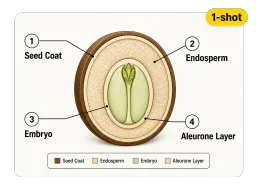
Visualización de infografías complejas
Genere datos densos, líneas de tiempo y gráficos como una sola imagen con diseño profesional.
Convierta un comando o una imagen de referencia en visuales listos para diseño con Seedream 5.0 Pro. Obtenga infografías densas, ediciones perfectas a nivel de píxel y texto preciso en más de 14 idiomas. Gratis para probar, no requiere habilidades de diseño.


Seedream 5.0 Pro es el modelo de imagen con AI de nivel profesional de ByteDance, lanzado en julio de 2026. Va más allá de la generación simple para manejar trabajo de diseño real: infografías densas, edición a nivel de píxel y salida por capas. Dele un comando o una imagen de referencia y planificará el diseño, la tipografía y la iluminación como lo haría un diseñador.
Escriba un comando para generar una imagen nueva, o añada hasta 10 imágenes de referencia para guiar el sujeto, estilo, personaje o producto. El modelo fusiona múltiples referencias en una sola escena con iluminación unificada e identidad constante.
Donde la mayoría de los modelos desenfocan el texto denso, este modelo renderiza tipografía multilínea e infografías precisas en un solo paso. Maneja pósteres de datos, menús y cuadrículas bilingües manteniendo cada etiqueta en su lugar correcto.
Señale, circule o bocete para editar regiones exactas, cambie un color mediante valor hex o divida el resultado en capas transparentes. La herramienta le permite refinar una imagen terminada en lugar de regenerar todo de nuevo.
De un comando a una imagen lista para producción en tres pasos
Añada una imagen de referencia opcional (hasta 10) y escriba su comando en cualquiera de los más de 14 idiomas compatibles, luego elija una relación de aspecto y calidad.
El modelo renderiza su imagen hasta en 2K. ¿Prefiere retocar una toma existente? Señale, circule o bocete la región exacta que desea cambiar.
Separe capas, cambie colores o materiales y corrija pequeños detalles, luego exporte su visual terminado en la relación que necesite.

Para educadores y analistas: convierta datos y conceptos densos en líneas de tiempo, gráficos y diagramas limpios en una sola generación, con la jerarquía y las etiquetas intactas.

Para vendedores en línea y equipos de marketing: genere tomas de producto, pósteres promocionales y banners multilínea con texto de precios preciso y colores acordes a la marca.

Para equipos globales: produzca pósteres y menús traducidos al árabe, español, japonés y más, con escritura correcta de derecha a izquierda, acentos y estilo visual local.

Para estudios y creadores: renderice texturas de piel, reflejos y materiales que se mantienen a escala de producción, luego perfeccione el resultado con el Mejorador de imágenes con AI.
Las capacidades que lo convierten en una herramienta de diseño, no solo en un generador
Genere datos densos, líneas de tiempo y gráficos como una sola imagen con diseño profesional.
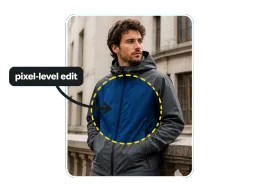
Señale, circule o bocete para editar regiones exactas y cambie colores por hex sin volver a dibujar.

Divida un resultado en más de 10 capas transparentes, con áreas ocultas rellenadas automáticamente para su reutilización.
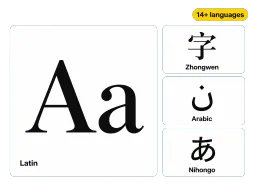
Escriba en más de 14 idiomas y obtenga un renderizado preciso con tipos de letra y estilos correctos.
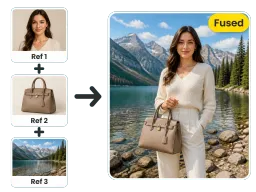
Combine hasta 10 imágenes de referencia en una sola escena con iluminación e identidad unificada.
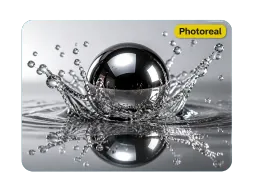
Luz físicamente precisa, reflejos, poros de la piel y textura de materiales en cada renderizado.
Planifica el diseño, la tipografía y la jerarquía, para que los requerimientos complejos resulten útiles, no solo bonitos.
Corrija una región, color u objeto mientras el resto de la imagen permanece exactamente como se generó.
1:1, 16:9, 9:16, 2:3 y más hasta 2K, desde publicaciones en redes sociales hasta pósteres listos para imprimir.
Ejecute Seedream 5.0 Pro gratis en su navegador, sin instalación y sin necesidad de habilidades de diseño.
“Subí una foto de producto y una paleta hex a Seedream 5.0 Pro y obtuve un banner promocional completo con el texto de precios correcto en un solo paso. La edición a nivel de píxel me permitió corregir una sombra sin tocar el resto de la imagen.”
“La separación por capas es la función que no sabía que necesitaba. Dividió mi póster en texto, sujeto y fondo para que pudiera recomponerlo en After Effects en minutos.”
“Lanzamos una campaña en árabe, español y japonés a partir de un solo comando. Manejó correctamente la escritura de derecha a izquierda y los acentos, algo que ningún otro modelo logró para nosotros.”
“Para infografías densas es increíble. Describí una línea de tiempo con puntos de datos y lo organizó todo limpiamente. Seedream 5.0 Pro entiende la jerarquía, no solo el estilo.”
“Subí una foto de producto y una paleta hex a Seedream 5.0 Pro y obtuve un banner promocional completo con el texto de precios correcto en un solo paso. La edición a nivel de píxel me permitió corregir una sombra sin tocar el resto de la imagen.”
“La separación por capas es la función que no sabía que necesitaba. Dividió mi póster en texto, sujeto y fondo para que pudiera recomponerlo en After Effects en minutos.”
“Lanzamos una campaña en árabe, español y japonés a partir de un solo comando. Manejó correctamente la escritura de derecha a izquierda y los acentos, algo que ningún otro modelo logró para nosotros.”
“Para infografías densas es increíble. Describí una línea de tiempo con puntos de datos y lo organizó todo limpiamente. Seedream 5.0 Pro entiende la jerarquía, no solo el estilo.”
Haga realidad ideas complejas, desde infografías y ediciones hasta diseños multilingües, en un solo modelo de AI. Gratis para empezar, directamente en su navegador.
