
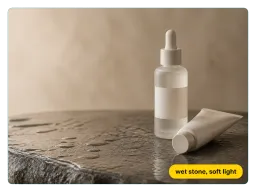
Beleza e cuidados com a pele
Frascos de vidro e tubos mantêm seus rótulos legíveis enquanto o comando adiciona pedra molhada, gotas de água ou um fundo com degradê suave.
Envie uma foto do produto, descreva a cena desejada e o Vorla entrega uma imagem de nível profissional em segundos — gratuito, online, sem necessidade de fotógrafo.


Vendedores da Shopify, Amazon e Etsy enviam uma foto com fundo branco e descrevem uma cena de estilo de vida que preenche o restante da galeria do anúncio — sem novo ensaio quando uma nova variante é lançada.
Profissionais de marketing de performance recriam fotos de um produto com novos cenários toda semana, mantendo os conjuntos de anúncios de Meta e TikTok atualizados sem reservar estúdio. Quando um briefing pede uma cena sem o produto, o gerador de fundos com AI assume o trabalho a partir daí.
Descreva um modelo em seu comando e a ferramenta coloca anéis, bolsas ou roupas no corpo — a foto com modelo que pequenas marcas de joias e vestuário costumam pagar uma equipe inteira para produzir.
Do clique no celular à imagem da loja, sem necessidade de habilidades de edição.
Arraste uma foto do seu produto — uma foto de celular em uma mesa simples é suficiente. A ferramenta mantém o item intacto e reconstrói tudo ao redor dele.
Digite a superfície, o fundo, a iluminação e os objetos de cena em português simples: "em mármore molhado, luz suave da manhã vindo da esquerda, um ramo de eucalipto ao lado". O comando é o único controle necessário.
Você recebe uma imagem finalizada para revisar. Altere algumas palavras no comando e execute novamente até que a foto combine com sua marca, então baixe o resultado.

Uma foto de celular em um balcão de cozinha torna-se uma composição de estúdio iluminada — fundo infinito, realces controlados e uma sombra suave sob o produto.

Um recorte plano de catálogo ganha um ambiente real — pedra, linho ou luz do dia — para que o mesmo SKU funcione como postagem social em vez de apenas uma miniatura de anúncio.
Um envio, uma caixa de comando — apenas o texto muda de categoria para categoria.
Frascos de vidro e tubos mantêm seus rótulos legíveis enquanto o comando adiciona pedra molhada, gotas de água ou um fundo com degradê suave.
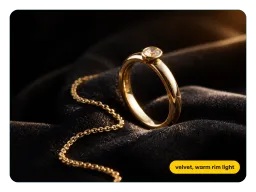
Anéis e correntes mantêm seus reflexos metálicos contra veludo, mármore ou a mão de um modelo — o detalhe que a fotografia de joias com AI costuma perder.
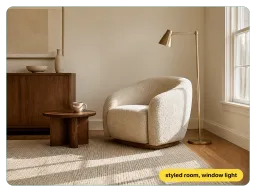
Coloque uma cadeira, luminária ou caneca em uma sala decorada para que os anúncios de móveis mostrem escala e contexto em vez de um recorte flutuante.
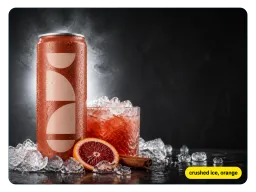
Latas, potes e lanches embalados ganham vapor, gelo, guarnição ou uma mesa posta completa a partir de uma linha de comando.
Controle da cena via comandos, com seu produto real mantido intacto.
Mude três palavras — de mármore para concreto bruto — e a cena muda. Sem controles deslizantes, camadas ou máscaras para aprender.
Rótulos, logotipos e acabamento do material sobrevivem à reconstrução, para que a imagem corresponda exatamente ao que será enviado na caixa.
Inclua um modelo na descrição e anéis, bolsas ou roupas aparecem no corpo — sem casting, sem ajustes.
Este aplicativo de fotografia de produtos com AI funciona no navegador do desktop ou celular, para que uma nova imagem de anúncio esteja a minutos de distância, onde quer que você esteja.
Do primeiro envio ao anúncio ativo.
“Anunciamos cerca de 40 novos SKUs por mês e costumávamos reservar meio dia de ensaio para cada lançamento. Agora eu envio a foto da amostra, peço um fundo de linho e a imagem do anúncio fica pronta antes mesmo da aprovação do pedido de compra.”
“Os reflexos no metal foram o que me convenceram. Fotografei um anel na minha mesa, pedi veludo e uma luz de destaque quente e baixa, e a pedra continuou parecendo a pedra que eu fotografei.”
“Gerencio o criativo de três contas DTC. O Vorla me permite criar uma dúzia de variantes de fundo de um produto principal em uma tarde, assim nossos conjuntos de anúncios no Meta param de saturar na segunda semana.”
“Cada jaqueta é enviada em seis cores e cada uma precisa de sua própria foto no corpo. Eu fotografo uma amostra, descrevo o modelo uma vez e executo o comando para cada cor — seis imagens em modelos a partir de uma única tarde de amostras.”
“Anunciamos cerca de 40 novos SKUs por mês e costumávamos reservar meio dia de ensaio para cada lançamento. Agora eu envio a foto da amostra, peço um fundo de linho e a imagem do anúncio fica pronta antes mesmo da aprovação do pedido de compra.”
“Os reflexos no metal foram o que me convenceram. Fotografei um anel na minha mesa, pedi veludo e uma luz de destaque quente e baixa, e a pedra continuou parecendo a pedra que eu fotografei.”
“Gerencio o criativo de três contas DTC. O Vorla me permite criar uma dúzia de variantes de fundo de um produto principal em uma tarde, assim nossos conjuntos de anúncios no Meta param de saturar na segunda semana.”
“Cada jaqueta é enviada em seis cores e cada uma precisa de sua própria foto no corpo. Eu fotografo uma amostra, descrevo o modelo uma vez e executo o comando para cada cor — seis imagens em modelos a partir de uma única tarde de amostras.”
Comandos, resultados e como utilizar as imagens.
Envie uma foto, descreva a cena e baixe uma imagem de nível profissional — sem câmera, sem cenário, sem fotógrafo.
