
Porträts
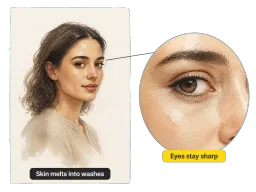
Haut wird zu dünnen, geschichteten Lasuren und die Glanzlichter fallen auf das blanke Papier zurück, während Augen und Mund ihre Linie halten – scharf genug für ein Profilbild, weich genug für einen gerahmten Druck.
Laden Sie ein beliebiges Foto hoch und der Aquarellfilter von Vorla malt es in Sekundenschnelle: durchscheinende Lasuren, Glanzlichter aus blankem Papier und echte Kaltpress-Körnung. Augen und Mund bleiben scharf, damit es immer noch nach Ihnen aussieht.
Durch das Hochladen von Bildern stimmen Sie unseren Nutzungsbedingungen zu und bestätigen unsere Datenschutzrichtlinie.

Aquarell verhält sich auf Haut, Fell, Himmel und Stein unterschiedlich. Ein Klick legt dieselben Lasuren, Verläufe und Papierkörnungen über alle vier, und das Motiv bestimmt, was daraus wird.
Haut wird zu dünnen, geschichteten Lasuren und die Glanzlichter fallen auf das blanke Papier zurück, während Augen und Mund ihre Linie halten – scharf genug für ein Profilbild, weich genug für einen gerahmten Druck.
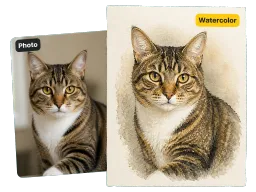
Nasses Pigment setzt sich im Fell ab und blüht dort auf, wo zwei Farben aufeinandertreffen, sodass die Streifen einer getigerten Katze und die Blesse eines Spaniels genau dort bleiben, wo sie im Foto sind.
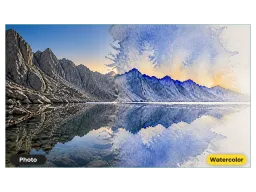
Himmel und Wasser fließen ineinander über, so wie nasses Pigment auf feuchtem Papier, und die Farbe sammelt sich dunkler entlang der Kammlinien.
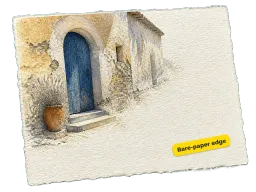
Alte Mauern, Türöffnungen und Marktstände nehmen die granulierte Papierstruktur auf, und die Ränder des Rahmens laufen in unbemaltes Papier aus.
Kein Photoshop, kein Plugin-Download und keine Farben oder Papier zum Kaufen. Der gesamte Aquarell-Effekt läuft online in Ihrem Browser.
Ziehen Sie ein JPG, PNG oder WEBP direkt aus Ihrer Galerie oder von Ihrem Desktop hinein. Es lädt im Browser, ohne dass etwas installiert werden muss.
Ein Klick setzt jede Lasur: Pigment sammelt sich am Rand jedes Strichs, Farben blühen beim Aufeinandertreffen auf und der Hintergrund wird auf demselben Blatt wie das Motiv gemalt.
Speichern Sie das fertige Aquarell in voller Auflösung, posten Sie es dann, drucken Sie es aus oder fügen Sie es in ein Karten- oder Einladungslayout ein.

Ein Aquarell wirkt wie Licht an einer Wand: helle Lasuren, weite Flächen aus blankem Papier und nichts Schweres, das mit dem Raum konkurriert. Lassen Sie ein Hochzeits-, Jubiläums- oder Neugeborenenfoto durch den Filter laufen, und die unbemalten Ränder rahmen sich selbst ein, sodass es perfekt in einem schlichten weißen Passepartout sitzt, ohne Designaufwand. Über A3 hinaus skalieren Sie die Datei zuerst mit dem AI Bild-Hochskalierer hoch.

Überspringen Sie die Warteliste und den Kostenvoranschlag – laden Sie das Foto hoch und erhalten Sie das Gemälde in der gleichen Minute zurück. Lockere Lasuren stehen Tieren besser als harte Umrisse: Das Fell wird an den Rändern weich, während die Augen dunkel und feucht bleiben, da dies der Teil ist, auf den Besitzer zuerst schauen. Es funktioniert genauso bei einem älteren Foto eines verstorbenen Haustiers.

Papeterie-Designer und Paare, die ihre eigenen Einladungen entwerfen, verwenden Aquarell, weil es weich druckt und Platz für Text auf dem blanken Papier an den Rändern lässt. Malen Sie den Veranstaltungsort, den Blumenstrauß oder das Paar und ziehen Sie die Datei dann direkt in ein InDesign-Kartenlayout.
Vier Personen, die drucken, was sie hier erstellen – Papeterie, Tierporträts, Familienwände und Shop-Angebote.
“Ich entwerfe Hochzeitspapeterie und habe früher einen Illustrator pro Skizze des Veranstaltungsorts bezahlt. Jetzt lade ich das Foto des Ortes hoch und bekomme ein Aquarell noch vor dem Kundengespräch zurück – drei Revisionen an einem Nachmittag statt in drei Tagen.”
“Ich male Aquarelle schlecht, aber ich weiß, wie Nass-in-Nass aussehen soll. Wo das Fell meines Pferdes auf das Feld hinter ihm trifft, verläuft die Farbe, anstatt zu verschmieren, und die Granulierung ist auch nach einem A2-Druck auf Büttenpapier noch sichtbar.”
“Ich hatte Bedenken, dass die Gesichter weichgezeichnet werden, da dies bei den meisten Aquarell-Voreinstellungen passiert. Habe ein Familienporträt durchlaufen lassen und die Augen blieben scharf, während alles um sie herum zu Lasuren wurde. Das ist der einzige Grund, warum ich es weiter benutzt habe.”
“Aquarell verkauft sich in unserem Print-on-Demand-Shop besser als jeder andere Stil, und jedes Angebot handzumalen war nie realistisch. Jetzt lade ich das Foto hoch, erhalte das Gemälde und stelle es noch am selben Tag ein. Die Lasuren halten auch bei Postergröße zusammen, wo billige Voreinstellungen matschig werden.”
“Ich entwerfe Hochzeitspapeterie und habe früher einen Illustrator pro Skizze des Veranstaltungsorts bezahlt. Jetzt lade ich das Foto des Ortes hoch und bekomme ein Aquarell noch vor dem Kundengespräch zurück – drei Revisionen an einem Nachmittag statt in drei Tagen.”
“Ich male Aquarelle schlecht, aber ich weiß, wie Nass-in-Nass aussehen soll. Wo das Fell meines Pferdes auf das Feld hinter ihm trifft, verläuft die Farbe, anstatt zu verschmieren, und die Granulierung ist auch nach einem A2-Druck auf Büttenpapier noch sichtbar.”
“Ich hatte Bedenken, dass die Gesichter weichgezeichnet werden, da dies bei den meisten Aquarell-Voreinstellungen passiert. Habe ein Familienporträt durchlaufen lassen und die Augen blieben scharf, während alles um sie herum zu Lasuren wurde. Das ist der einzige Grund, warum ich es weiter benutzt habe.”
“Aquarell verkauft sich in unserem Print-on-Demand-Shop besser als jeder andere Stil, und jedes Angebot handzumalen war nie realistisch. Jetzt lade ich das Foto hoch, erhalte das Gemälde und stelle es noch am selben Tag ein. Die Lasuren halten auch bei Postergröße zusammen, wo billige Voreinstellungen matschig werden.”
Kosten, Wasserzeichen, Telefon-Support und was genau der Filter an Ihrem Foto ändert.
Laden Sie ein Foto hoch und es kommt als dünne Lasuren auf Kaltpress-Papier zurück, mit verlaufenden Rändern und Glanzlichtern als blankes Weiß. Kostenlos online, keine Anmeldung, kein Wasserzeichen, und das Gemälde wird direkt auf Ihrem Telefon oder Desktop in voller Größe gespeichert.
