
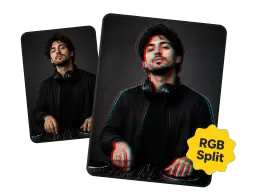
RGB Color Split
Red and cyan channels shift apart for the classic chromatic-aberration glitch look.
Upload a photo and turn it into glitch art in one click. Vorla adds RGB color split, scanlines, digital static, and pixel displacement while keeping the subject recognizable.
By uploading images, you agree to our Terms of Service and review our Privacy Policy.

Every photo glitch effect from Vorla layers these signature distortions over your image.
Red and cyan channels shift apart for the classic chromatic-aberration glitch look.
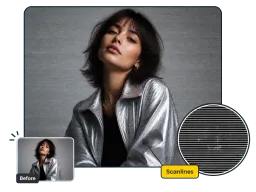
Fine CRT scanlines and a layer of digital noise give photos a retro, broken-screen feel.
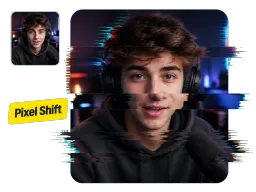
Horizontal pixel streaks and pixel sorting drag colors across the frame for a corrupted-signal glitch overlay.
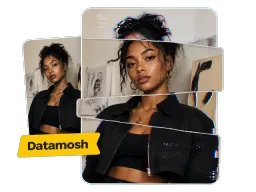
Torn, offset slices fracture the image into sharp glitch bands while keeping your subject visible.
No software, no layers, no manual editing.
Upload the photo you want to turn into a recognizable, medium-intensity glitch-art image.
Vorla instantly adds RGB split, scanlines, and pixel distortion — with no settings to tweak.
Download the generated glitch-art image for social posts, covers, posters, or creative edits.

Make Instagram and TikTok posts stop the scroll with a distorted, glitchy edit that reads as intentional art.

Give synthwave, hyperpop, and electronic covers a corrupted, futuristic edge that matches the sound.

Build Twitch and YouTube thumbnails or esports banners with a broken-signal look. Pair it with an AI Line Art Generator pass for extra edge.

Add cyberpunk and Y2K energy to event posters, zines, and promo flyers in seconds.
Real feedback from designers, artists, and streamers.
“I dropped a band photo in and had a corrupted album cover in seconds — the RGB split landed exactly where I would have masked it by hand.”
“My Twitch thumbnails finally look like the stream. The glitch effect keeps my face readable but wrecks the background just enough.”
“I run a small zine and this replaced a 20-minute manual editing routine. Scanlines and datamosh slices in one click, no layers to manage.”
“Used it on product shots for a synthwave merch drop. The pixel distortion reads as intentional, not broken, while the subject still stays recognizable.”
“I dropped a band photo in and had a corrupted album cover in seconds — the RGB split landed exactly where I would have masked it by hand.”
“My Twitch thumbnails finally look like the stream. The glitch effect keeps my face readable but wrecks the background just enough.”
“I run a small zine and this replaced a 20-minute manual editing routine. Scanlines and datamosh slices in one click, no layers to manage.”
“Used it on product shots for a synthwave merch drop. The pixel distortion reads as intentional, not broken, while the subject still stays recognizable.”
Answers about one-click generation, visual style, and how the tool works.
Upload an image and add a bold glitch effect in one click — free, online, and no sign-up.
