
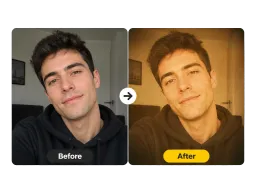
Portrait Selfie
An everyday selfie gains warm skin tones, soft grain, and a gentle glow from the filter, as if it was shot on Kodak Gold film.
Upload a photo and apply Vorla's 90s filter in one click. Get warm Kodak Gold tones, fine film grain, and faded color while your subject and background stay untouched.
By uploading images, you agree to our Terms of Service and review our Privacy Policy.

The same warm 90s film look, applied to selfies, group shots, streets, and pets.
An everyday selfie gains warm skin tones, soft grain, and a gentle glow from the filter, as if it was shot on Kodak Gold film.
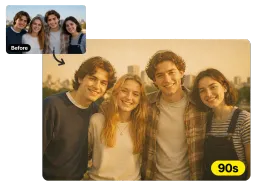
Friends and family pick up faded highlights and nostalgic warmth, turning a modern group shot into a 90s disposable-camera memory.
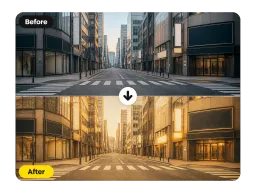
Buildings, signs, and streets take on muted retro color and soft halation, recreating the look of a 35mm film photo from the 90s.
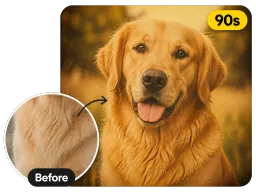
Your pet keeps every detail while the whole frame warms into the grainy, faded tones of the retro filter.
Three steps, no sign up, no editing skills.
Drag and drop or select any JPG or PNG photo from your phone or computer.
Click once and the filter adds warm film tones, grain, and fade automatically — there are no sliders to adjust.
Preview the retro result and save your 90s photo in full resolution, ready to post or print.

Creators use the filter to turn fresh selfies into nostalgic film shots, giving a feed one cohesive retro aesthetic that stops the scroll.

Recreate a 90s disposable-camera vibe for #tbt carousels and reunions. Reviving old black-and-white shots first? Run them through Colorize Black and White Photos, then add the 90s film look.

Designers build warm, vintage mood boards, poster layouts, and print zines with a consistent 90s film look across every image.
Real results from creators, designers, and music makers.
“I ran my whole camera roll through the 90s filter for a reunion slideshow — the warm grain made every photo look like it came off a disposable camera.”
“I needed a consistent retro look across 30 images. Vorla's 90s filter matched them perfectly with one click each, so I skipped all the manual color grading.”
“My selfies finally look like they were printed at a 90s photo booth — it kept my face completely natural and only changed the colors and grain.”
“I ran a set of tour photos through the 90s filter for our merch drop — the grain and faded color gave every shot one consistent vintage look.”
“I ran my whole camera roll through the 90s filter for a reunion slideshow — the warm grain made every photo look like it came off a disposable camera.”
“I needed a consistent retro look across 30 images. Vorla's 90s filter matched them perfectly with one click each, so I skipped all the manual color grading.”
“My selfies finally look like they were printed at a 90s photo booth — it kept my face completely natural and only changed the colors and grain.”
“I ran a set of tour photos through the 90s filter for our merch drop — the grain and faded color gave every shot one consistent vintage look.”
Answers on pricing, formats, watermarks, and how the film effect works.
Upload a photo and apply Vorla's warm 90s film look in one click — free, online, and ready in seconds.
