
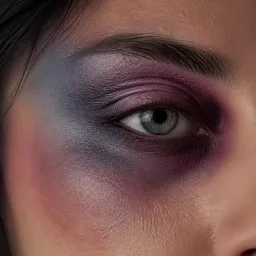
Fresh Plum
Deep plum-purple sits on the upper lid and inner corner, where a day-old shiner really lands.
Upload a photo and this free online black eye filter adds a realistic fake bruise in seconds. Vorla keeps your face, pose, lighting, and background exactly as you shot them.
By uploading images, you agree to our Terms of Service and review our Privacy Policy.

Four things to look for in the result, up close.
Deep plum-purple sits on the upper lid and inner corner, where a day-old shiner really lands.
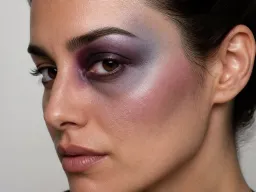
Color fades through blue-gray across the brow bone and onto the cheekbone instead of stopping at a painted edge.
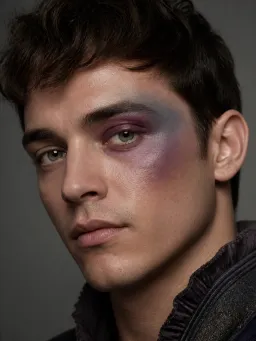
The lid picks up a slight puffiness and faint sheen, so the bruise reads as skin rather than a sticker.
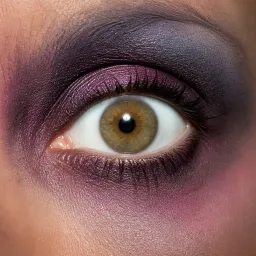
The white of the eye and the iris stay clear, so the eye still looks open while the socket around it darkens.
No brush, no mask, no makeup kit.
Drop in a selfie, headshot, or cosplay frame where the eyes, brow, and cheekbone are in view.
The filter finds the eye socket on its own and builds the bruise around it — one click, no makeup and nothing to paint by hand.
Your staged black eye comes back in seconds at full quality, ready to save and post.

See how a bruised eye sits on your own face before you buy a bruise wheel or block out an evening for practice. One upload shows you exactly where the color lands and how far it fades, so you can copy the placement at the mirror.

Fighters, survivors, and beaten-up antiheroes all need the same shorthand. Preview the injury on your reference selfie, then pair it with AI Makeup Generator to lock the rest of the character's face.

The classic reaction photo, without the reaction. Send friends or family a convincing shiner from a normal selfie and keep the room, the outfit, and the lighting identical so it holds up.
From costume nights to camera tests.
“I run a small cosplay group and we used to lose an hour per person on bruise makeup. Now I preview the black eye filter on everyone's reference photo first, so we only paint the version we already picked.”
“What sold me was the falloff. Most face effects drop a flat purple blob over the eye; this one carried the color onto the cheekbone and left the lashes and iris alone, so my client could actually see what the finished makeup would look like.”
“Sent my brother a shiner selfie from the exact same kitchen, same hoodie, same lamp. He called in about nine seconds. The background not moving is the whole trick.”
“We needed a bruised look for a stage poster and had no budget for a makeup call. Two uploads on Vorla and the director had something to approve the same afternoon.”
“I run a small cosplay group and we used to lose an hour per person on bruise makeup. Now I preview the black eye filter on everyone's reference photo first, so we only paint the version we already picked.”
“What sold me was the falloff. Most face effects drop a flat purple blob over the eye; this one carried the color onto the cheekbone and left the lashes and iris alone, so my client could actually see what the finished makeup would look like.”
“Sent my brother a shiner selfie from the exact same kitchen, same hoodie, same lamp. He called in about nine seconds. The background not moving is the whole trick.”
“We needed a bruised look for a stage poster and had no budget for a makeup call. Two uploads on Vorla and the director had something to approve the same afternoon.”
Free, sign-up, watermark, and what the effect actually touches.
One upload, one click, and a realistic fake black eye in seconds.
