
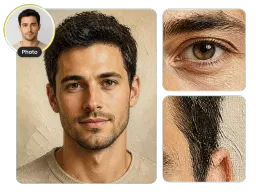
Portraits
Skin softens into blended strokes while the eyes and mouth stay sharp, so the face still reads as yours in a framed print or a profile picture.
Upload a photo and Vorla's oil painting filter repaints it in seconds: thick directional brushstrokes, saturated pigment, and woven canvas grain. Your face, pose, and background stay exactly as you shot them.
By uploading images, you agree to our Terms of Service and review our Privacy Policy.

One oil painting filter, four very different uploads. Portraits, pets, landscapes, and still life each come back with the brushwork that subject needs.
Skin softens into blended strokes while the eyes and mouth stay sharp, so the face still reads as yours in a framed print or a profile picture.
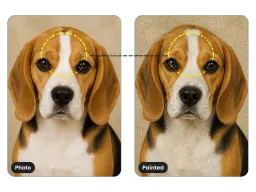
Fur becomes directional brushwork instead of a smudge, and your dog or cat keeps its exact markings.
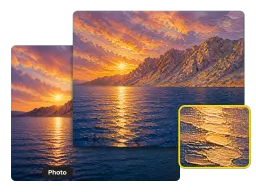
Skies and water take the loose, layered strokes oil painters use, with impasto ridges along the brightest light.
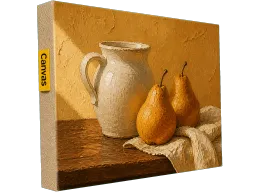
Hard product edges hold their shape while every surface picks up thick pigment and a woven canvas grain.
No Photoshop, no plugin, and nothing to download. The whole oil painting effect runs online in your browser, dialed in before you upload.
Drop in a JPG, PNG, or WEBP from your phone or your desktop. It loads straight into the browser with nothing to download.
One click rebuilds the whole picture in oil paint, from directional strokes and impasto highlights to the canvas grain behind them, background included.
Save the finished painting at full resolution, then post it, print it as a poster or on canvas, or wrap it as a gift.

Families and newlyweds run a favorite wedding, anniversary, or holiday photo through the oil painting filter and send it to a canvas printer, so a phone snapshot ends up on a hallway wall looking commissioned rather than uploaded. For a large-format print, size the painting up first with the AI Image Upscaler.

Owners turn a phone photo of a dog or cat into a painted portrait with the fur rendered in real brushstrokes, skipping the weeks a commissioned pet painting takes. Markings, collar, and eye color all land exactly where they were in the photo.

Creators post painted versions of travel shots and product photos to Instagram and Pinterest, then reuse the same file as a channel banner or a playlist cover, where a painted image reads completely differently from the clean studio photos around it.
Canvas prints, pet portraits, shop listings, and travel feeds, all from a single upload.
“I had one decent photo from my parents' fortieth and no budget for a painter. Uploaded it, printed the result on a 24-inch canvas, and my mother asked which artist we hired. The brush texture holds up close, which is what I was worried about.”
“My spaniel has a white patch shaped like a comma over one eye, and every art app I tried smeared it into the rest of his face. This one kept the patch exactly where it sits and still painted the fur in real strokes.”
“I sell printable wall art and my listings all looked like the same stock photos. Running each shot through the oil painting filter gave me a whole painted collection in an afternoon, and the canvas grain survives print at 300 DPI.”
“I shoot markets and street food, and my grid was drowning in identical clean travel photos. Painted versions stop people mid-scroll. Saves come in three times higher on those posts than on the originals.”
“I had one decent photo from my parents' fortieth and no budget for a painter. Uploaded it, printed the result on a 24-inch canvas, and my mother asked which artist we hired. The brush texture holds up close, which is what I was worried about.”
“My spaniel has a white patch shaped like a comma over one eye, and every art app I tried smeared it into the rest of his face. This one kept the patch exactly where it sits and still painted the fur in real strokes.”
“I sell printable wall art and my listings all looked like the same stock photos. Running each shot through the oil painting filter gave me a whole painted collection in an afternoon, and the canvas grain survives print at 300 DPI.”
“I shoot markets and street food, and my grid was drowning in identical clean travel photos. Painted versions stop people mid-scroll. Saves come in three times higher on those posts than on the originals.”
Cost, watermarks, commercial use, and exactly what the filter changes in your photo.
One upload, one click, and your photo comes back as a painting. Free online, no sign-up, no watermark, and the finished painting downloads at full resolution with nothing to install.
