
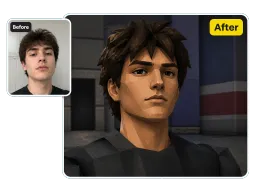
Selfie to PS2
Turn a single selfie into a low-poly PS2 protagonist with plasticky skin and soft engine lighting.
Upload any photo and Vorla's free online PS2 filter re-renders you as a low-poly PlayStation 2 game character — plasticky textures, soft engine lighting, and 480p nostalgia in one click.
By uploading images, you agree to our Terms of Service and review our Privacy Policy.

One upload, one click — see how it restyles selfies, couples, pets, and group shots into PS2 game characters.
Turn a single selfie into a low-poly PS2 protagonist with plasticky skin and soft engine lighting.
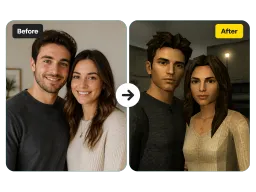
Restyle a couple photo as two PS2 game characters sharing one nostalgic 480p game scene.
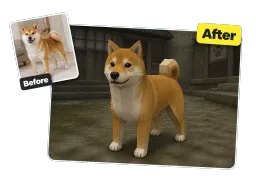
Convert a pet photo into a blocky PS2 companion model with retro low-resolution repeating textures.
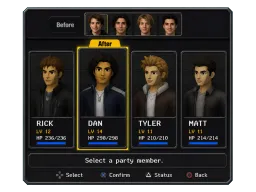
Rebuild a group photo as a full party of low-poly characters inside a PS2 game environment.
Three steps, no design skills.
Drag in any selfie, portrait, pet, or group shot in JPG or PNG — no editing needed.
The PS2 filter AI auto-detects your subject and re-renders it as a PS2 game character in seconds.
Preview the low-poly result and save your PS2 image in high resolution, ready to post.

Post your PS2 game-character selfie to TikTok, Instagram, and Shorts to ride the retro PS2 game-character trend.

Create a low-poly PS2 profile picture for Discord, Steam, or gaming accounts with early-2000s nostalgia.

Build Y2K moodboards and gaming-inspired art, then keep editing with the AI Selfie Generator.
“I ran my gym selfie through the filter and it nailed that early-2000s PS2 NPC look — low-poly face, plasticky skin, the whole vibe. Pulled 40k views on TikTok overnight.”
“I wanted a matching retro avatar for our Discord server, so I dropped in our group photo. The filter turned all of us into game characters in one click — zero Photoshop.”
“For my Y2K moodboards this is the fastest way to get authentic 480p game textures. It keeps my face recognizable while making everything blocky and nostalgic.”
“Uploaded a photo of my dog and got back a hilarious low-poly PS2 pet character. The murky lighting and jaggy polygon edges look exactly like a 2003 game.”
“I make a new PS2 character for every stream intro. The low-poly render keeps my face readable at small sizes, so my Twitch avatar actually looks like me — just dropped into a 2003 game.”
“Turned our engagement photo into two PS2 game characters for a nostalgic save-the-date. The plasticky textures and soft lighting were spot-on, and both faces still clearly read as us.”
“Did the whole thing on my phone during a lunch break — no app to install. Uploaded a selfie, tapped once, and had a shareable PS2 portrait in under a minute.”
“I design retro merch and used the PS2 filter to prototype Y2K game-character prints. The consistent low-poly look across a batch of photos saved me hours of manual 3D work.”
“I ran my gym selfie through the filter and it nailed that early-2000s PS2 NPC look — low-poly face, plasticky skin, the whole vibe. Pulled 40k views on TikTok overnight.”
“I wanted a matching retro avatar for our Discord server, so I dropped in our group photo. The filter turned all of us into game characters in one click — zero Photoshop.”
“For my Y2K moodboards this is the fastest way to get authentic 480p game textures. It keeps my face recognizable while making everything blocky and nostalgic.”
“Uploaded a photo of my dog and got back a hilarious low-poly PS2 pet character. The murky lighting and jaggy polygon edges look exactly like a 2003 game.”
“I make a new PS2 character for every stream intro. The low-poly render keeps my face readable at small sizes, so my Twitch avatar actually looks like me — just dropped into a 2003 game.”
“Turned our engagement photo into two PS2 game characters for a nostalgic save-the-date. The plasticky textures and soft lighting were spot-on, and both faces still clearly read as us.”
“Did the whole thing on my phone during a lunch break — no app to install. Uploaded a selfie, tapped once, and had a shareable PS2 portrait in under a minute.”
“I design retro merch and used the PS2 filter to prototype Y2K game-character prints. The consistent low-poly look across a batch of photos saved me hours of manual 3D work.”
Upload your photo and let Vorla turn you into a low-poly PlayStation 2 game character in seconds.
