
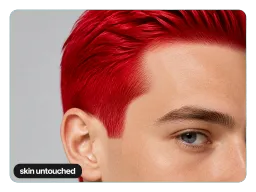
Only Your Hair Changes
Your face, skin, brows, clothing and background come back exactly as you shot them, and the hairline stays crisp, so there is no red haze on your forehead, ears or collar.
Upload a photo and Vorla's red hair filter recolors your hair to a vivid saturated cherry red in seconds. Free and online, with your face, skin, and background left exactly as you shot them.
By uploading images, you agree to our Terms of Service and review our Privacy Policy.

One shade, already dialed in. It lands on any starting color, follows the hair you actually have, and stays on the hair only.
Your face, skin, brows, clothing and background come back exactly as you shot them, and the hairline stays crisp, so there is no red haze on your forehead, ears or collar.
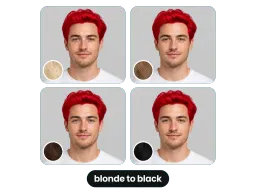
Blonde, light brown, dark brown and black all run through the same single pass. Lighter hair comes back brighter and darker hair deeper, and every one of them lands unmistakably red.
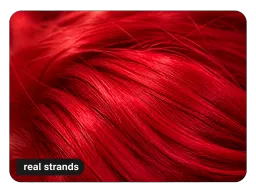
The red follows the strand direction, highlights and shadows already in your photo, sitting a touch deeper at the roots and blazing to crimson where the light hits.
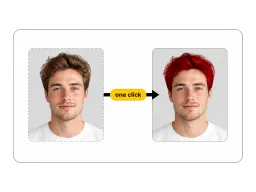
No color picker, no sliders, no layers to manage. The shade is already dialed in, so one upload and one click is the whole job.
No app to install, no color slider to drag, and no salon appointment to book. The whole thing runs in your browser.
Drop in a JPG, PNG, or WEBP from your camera roll or your desktop. A clear, well-lit shot with the hairline visible gives the cleanest edges.
One click. The filter follows the strand direction, highlights, and shadows already in your hair, so the red sits on real hair structure instead of a flat painted mask.
Save the result at full resolution, then post it, send it to your colorist, or drop it into a costume mood board.

Colorists get asked for red and hand back everything from ginger to burgundy. Run your own photo through first and bring that to the consultation, so the reference is your face, your hair length, and your skin tone instead of a celebrity shot that was never going to match. To weigh red against other shades in the same sitting, open the Virtual Hair Color Try On.

A red-hair selfie stops the scroll where an ordinary one does not, and the red hair filter gives you the version that survives a full-screen tap: no orange halo across the forehead, no red bleeding onto the ears, and the flyaways at the crown recolored along with everything else. Post it, or run it as your profile picture for a week and see who notices.

Half the characters worth cosplaying are redheads, and wig shopping starts with knowing how a bold red actually sits on your face. Recolor a head-and-shoulders shot before you order, then drop the same image into the group chat to settle who is going red for Halloween.
Four people who used the preview before booking a colorist, ordering a wig, or posting.
“Clients used to bring me a photo of an actress with a completely different base color. Now I ask them to run their own shot through this first, and we open the consultation on a red that already sits on their skin tone. My redo appointments have dropped right off.”
“I have black hair, so every red filter I tried before either went muddy or turned my whole head into a flat sticker. This one kept the shine lines where my hair actually catches light, which is the only reason the con photos held up. Ordered the wig off the back of it.”
“I had been talking about going red for two years and never booked it. Seeing my own face under a proper red instead of imagining it was the thing that decided it. Sent the picture to the salon and booked that evening.”
“I shoot a lot of talking-head video and wanted one still that looked different for a thumbnail. The hairline is the part that normally gives these away, and there is no red on the forehead here, plus the stray hairs at the top got colored too. Nobody in the comments asked if it was a filter.”
“Clients used to bring me a photo of an actress with a completely different base color. Now I ask them to run their own shot through this first, and we open the consultation on a red that already sits on their skin tone. My redo appointments have dropped right off.”
“I have black hair, so every red filter I tried before either went muddy or turned my whole head into a flat sticker. This one kept the shine lines where my hair actually catches light, which is the only reason the con photos held up. Ordered the wig off the back of it.”
“I had been talking about going red for two years and never booked it. Seeing my own face under a proper red instead of imagining it was the thing that decided it. Sent the picture to the salon and booked that evening.”
“I shoot a lot of talking-head video and wanted one still that looked different for a thumbnail. The hairline is the part that normally gives these away, and there is no red on the forehead here, plus the stray hairs at the top got colored too. Nobody in the comments asked if it was a filter.”
Cost, watermarks, which shade you get, and exactly what the filter changes in your photo.
See what you would look like with red hair: upload one photo and get it back with vivid cherry red hair, a clean hairline, and everything else exactly as you shot it. Free online, no sign-up, no watermark, and the file saves straight to your phone or desktop at full size.
