
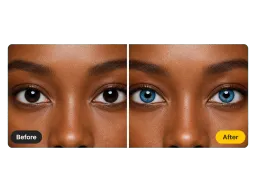
Dark Brown Eyes
The hardest starting point. Instead of painting a flat disc, the AI rebuilds the fiber pattern so a near-black iris reads as a real blue one.
Upload a photo and Vorla's free online blue eye filter recolors the iris to a clear, natural blue in seconds. Pupils, catchlights, and skin tone stay exactly as you shot them.
By uploading images, you agree to our Terms of Service and review our Privacy Policy.

Four common starting points, one consistent result - only the iris color changes.
The hardest starting point. Instead of painting a flat disc, the AI rebuilds the fiber pattern so a near-black iris reads as a real blue one.
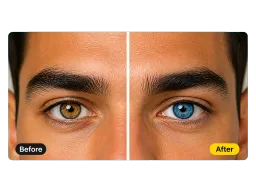
Mixed irises keep their depth. Warm flecks give way to blue while the darker outer ring comes back in blue, so the eye still has an edge instead of a painted rim.
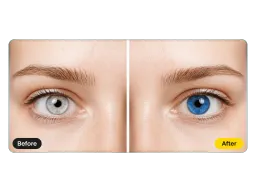
Pale irises that washed out in daylight come back saturated. This is the blue eyes filter people look for when the color they actually have never made it to the camera.
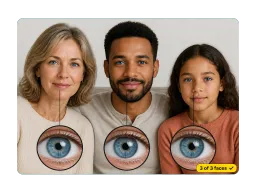
Every visible face is handled in the same pass, so a family shot comes back consistent rather than one edited face among several untouched ones.
No masks, no brushes, no editing experience.
Drag in any portrait or selfie. Group shots work too - every visible face in the photo is handled.
The blue eye filter locates each iris on its own and leaves the pupils, eyelashes, and whites of the eyes alone.
Save the finished photo in seconds, then post it, print it, or send it straight into your next edit.

See how blue lenses read against your own face and skin tone before you order a pair. No trial set, no shipping wait, no returns if the shade turns out wrong.

Blonde hair with blue eyes is the pairing people try first. Recolor the eyes here, then take the same photo to Virtual Hair Color Try On to test the hair.

Give a costume shoot the blue eyes the character calls for, without buying a set of lenses or masking irises frame by frame afterwards.

Indoor light flattens an iris to grey in exactly the shots people post. Run the selfie you were about to upload through the filter and the eye color in your feed matches the one in the mirror.
Portrait shooters, cosplayers, and everyday selfie takers.
“My daughter has almost black irises and every other app just dropped a blue circle on top of them. This one kept the little light fleck in her eye, so the photo still looks like her.”
“I run a small lens shop and I now send customers a blue-eye preview of their own selfie before they order. Wrong-shade returns dropped noticeably in the first month.”
“Shot a full cosplay set outdoors and left the contacts at home. Ran the frames I was posting through the blue eye filter that night and nobody who saw the set could tell.”
“My eyes are already blue but they go grey under office lighting on video calls. One pass and my profile photo finally shows the color I actually have.”
“My daughter has almost black irises and every other app just dropped a blue circle on top of them. This one kept the little light fleck in her eye, so the photo still looks like her.”
“I run a small lens shop and I now send customers a blue-eye preview of their own selfie before they order. Wrong-shade returns dropped noticeably in the first month.”
“Shot a full cosplay set outdoors and left the contacts at home. Ran the frames I was posting through the blue eye filter that night and nobody who saw the set could tell.”
“My eyes are already blue but they go grey under office lighting on video calls. One pass and my profile photo finally shows the color I actually have.”
Everything people ask before their first upload.
Upload one photo and Vorla handles the rest - free, online, and done in seconds.
