
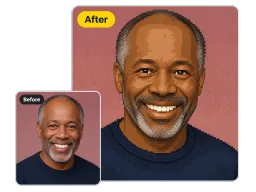
Portraits
Faces keep their expression and hairline while skin tones collapse into flat retro blocks.
Upload a photo and get free pixel art in seconds: chunky square blocks on one clean grid, a limited retro palette, and hard edges. Your subject, pose, and background stay exactly as you shot them.
By uploading images, you agree to our Terms of Service and review our Privacy Policy.

The same pixel art maker, from image upload to finished retro art - one click each, four very different photos.
Faces keep their expression and hairline while skin tones collapse into flat retro blocks.
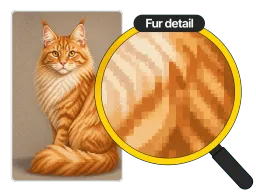
Fur becomes readable pixel clusters instead of a smudge, so the animal still reads at a glance.
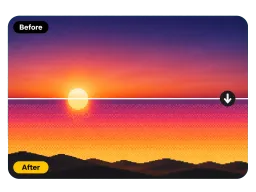
Skies and horizons band into dithered gradients, the way 16-bit game backgrounds handled sunsets.
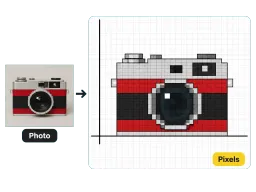
Straight edges snap to the grid, turning an everyday object into a crisp retro icon.
No layer panels and no palette to configure - the grid, the block size, and the retro colors are already set for you.
Drop in the image you want pixelated. It loads straight into the converter in your browser, on desktop or phone.
One click rebuilds the whole picture from square pixel blocks held at a single consistent size across the frame.
Save the finished pixel art and drop it straight into an avatar slot, an icon set, or a game mockup.

Streamers and Discord regulars run a selfie through the pixel art maker to get an avatar that still reads at 64 pixels wide, where a downscaled photo turns to mush.

Indie developers pixelate reference photos into stand-in tiles and character art, so an early build looks intentional instead of half-finished. For a console-era 3D look instead, try the PS2 Filter.

Small shops convert product photos into 8-bit style visuals for Instagram drops, sticker sheets, and merch mockups that cut through a feed of clean studio shots.
Avatars, game mockups, merch art, and classroom demos, all made from one upload.
“I run my Twitch avatar at 64 pixels and every normal photo turned to mush. One pass through Vorla and my face still reads at that size - same hair, same hoodie, just blocks.”
“I ran reference photos through it all week for a prototype, and the block size stayed identical every time, so the placeholder tiles read as one art set instead of thirty separate experiments.”
“Our sticker sheets sell better when the art looks like an old cartridge game. I upload a product photo, get flat retro colors back, and it prints clean because there are no soft gradients to muddy the ink.”
“I teach a unit on limited palettes and this is the fastest way to show it. Students upload their own photo, see it come back as flat blocks, and instantly get why color choice matters more than resolution.”
“I run my Twitch avatar at 64 pixels and every normal photo turned to mush. One pass through Vorla and my face still reads at that size - same hair, same hoodie, just blocks.”
“I ran reference photos through it all week for a prototype, and the block size stayed identical every time, so the placeholder tiles read as one art set instead of thirty separate experiments.”
“Our sticker sheets sell better when the art looks like an old cartridge game. I upload a product photo, get flat retro colors back, and it prints clean because there are no soft gradients to muddy the ink.”
“I teach a unit on limited palettes and this is the fastest way to show it. Students upload their own photo, see it come back as flat blocks, and instantly get why color choice matters more than resolution.”
Cost, watermarks, commercial use, and what actually changes in your image.
One upload, one click, and your photo comes back as clean retro pixel art with the subject still intact.
